
This is the employee view. This article shows how to find opportunities that fit you and how to apply for one.
On this page
🔍 Where to find opportunities
On your dashboard, the “Opportunities for you” card shows the opportunities that fit you best. “View all opportunities” takes you to the full list, the “Browse opportunities” tab. You can also open it at any time via “Opportunities” in the sidebar.
Above the list you can filter by type, by “Location type”, by “Location”, or by team or organisation, and you can search for an opportunity by name.
📊 Read your match
Every opportunity in the list shows your match, so you can see at a glance what fits you. When you open an opportunity, “Candidate requirements” lists each required skill with its level and weight and shows how well you cover it. A required role that is missing from your profile is marked there as well.
✉️ How to apply
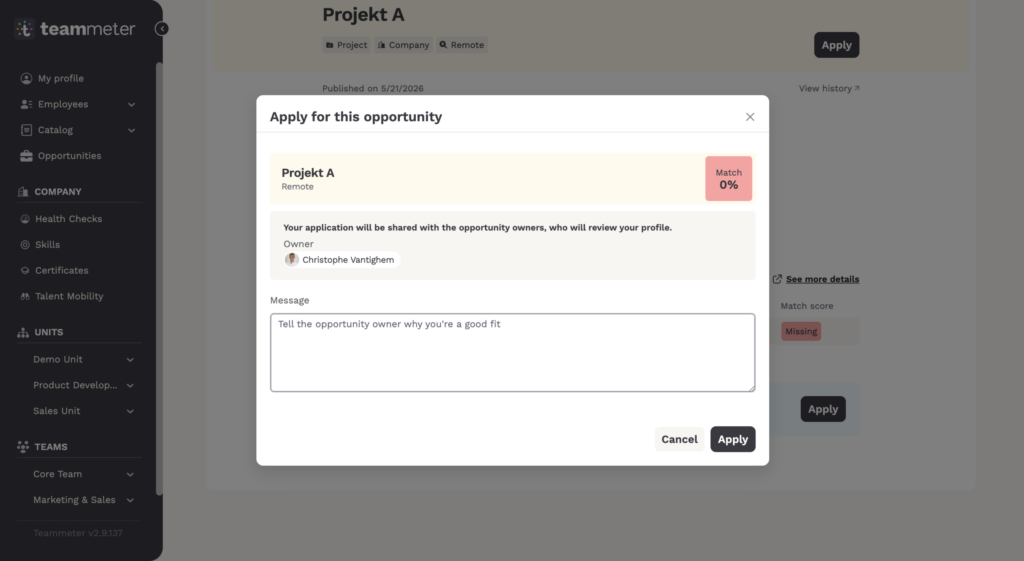
Click “Apply”. The window “Apply for this opportunity” shows your match once more and the owner who receives your application. You can add a short message. This helps especially when your match is low and you still fit.
ℹ️ Note: You can always apply, even when your match is low. Only the owner of the opportunity sees your application, together with your public profile and your skills.
Your manager does not get a notification when you apply.
✅ After you apply
You get a confirmation by email, and the opportunity now shows the status “Applied”. The owner reviews your profile and lets you know how things move on. You can check the status of your application at any time, and you can withdraw it on the opportunity page.
🧭 If you were invited and do not want to apply
An invitation from the responsible person is not an application. If you want to decline it, you do not need to do anything, and there is nothing to withdraw. You can only withdraw an application you have already sent.
Related articles
Getting help
If something does not work as described here, write to support@teammeter.com.